

A photo of open laptops, arrayed on a table, from above
Collection

Digital Media Projects in Chemistry: An Annotated Assignment

This collection explores a digital media project in a general chemistry course. Included are the assignment description, a sample student project, and resources to support students' work and instructor assessment efforts. Be sure to read the annotations on the linked files.

Updated August 2025
Michael Palmer headshot
Barbara Fried Director & Professor
Office of the Executive Vice President and Provost
View Bio
01

Assignment Description

Michael Palmer

This document includes the assignment description for a video-based, collaborative digital media project that can be adapted to many teaching contexts.

Headshot of Michael Palmer
Michael Palmer

I have assigned this collaborative, video-based digital media project in a large-enrollment (110 students) chemistry lab course to pique students' curiosity and wonder by allowing them to explore their ideas and questions about a chemistry topic of their choosing. The project is highly scaffolded and is easily adaptable for other teaching contexts. I've annotated the description to help other instructors understand my decisions.

View excerpt

The Digital Media Project (DMP) gives you the opportunity to explore a chemical product or process that interests you and then to produce a 3-5 minute movie or photo story which creatively teaches something about the chemistry. The completed project must effectively illustrate the chosen chemistry and should be self-explanatory to a knowledgeable layperson; i.e. the "point" of the project should be clear without explanation. Exceptional projects will be both technically sound and aesthetically pleasing.
Was this resource helpful?
02

Project Example: Grease

Michael Palmer

This student-produced video shows an example of a high-quality project created for this assignment.

Headshot of Michael Palmer
Michael Palmer

This is a wonderful example of one group's project exploring the chemistry of grease, a topic not discussed explicitly in class. It is informative, highly creative, and aesthetically pleasing. (Shared with permission.)

Was this resource helpful?
03

Resource: Storyboard Template

Michael Palmer

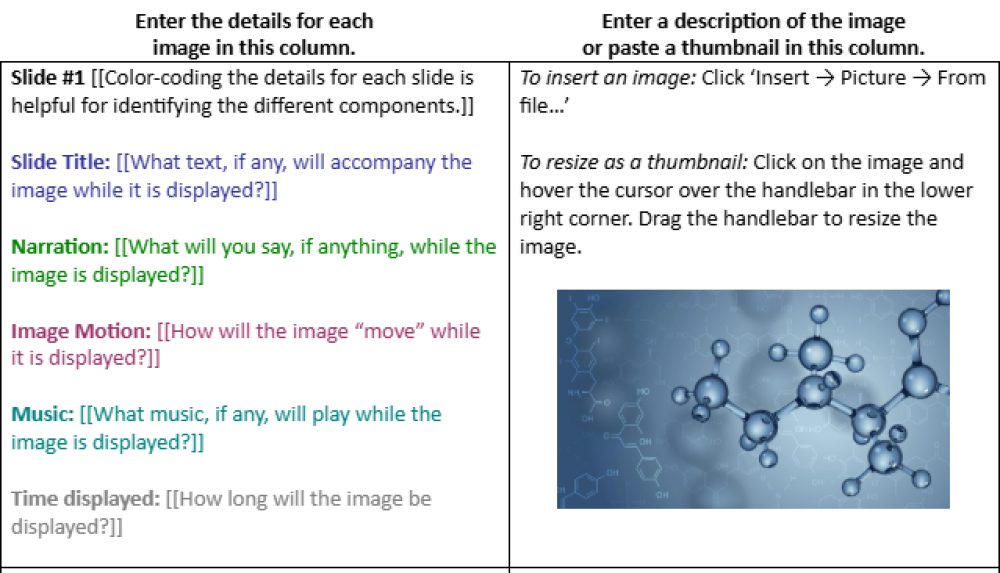
Here is a storyboard template that can be used when assigning video-based digital media projects.

Headshot of Michael Palmer
Michael Palmer

Having students develop a storyboard is an essential step in the project timeline that helps them organize their ideas and plan out key segments of their project. Without it, they often have to re-film scenes, collect new footage, or re-record audio, all of which are time-consuming activities. Seeing the storyboard earlier on in the project also helps me head off potential problems.

View excerpt
Was this resource helpful?
04

Resource: Storyboard Example

Michael Palmer

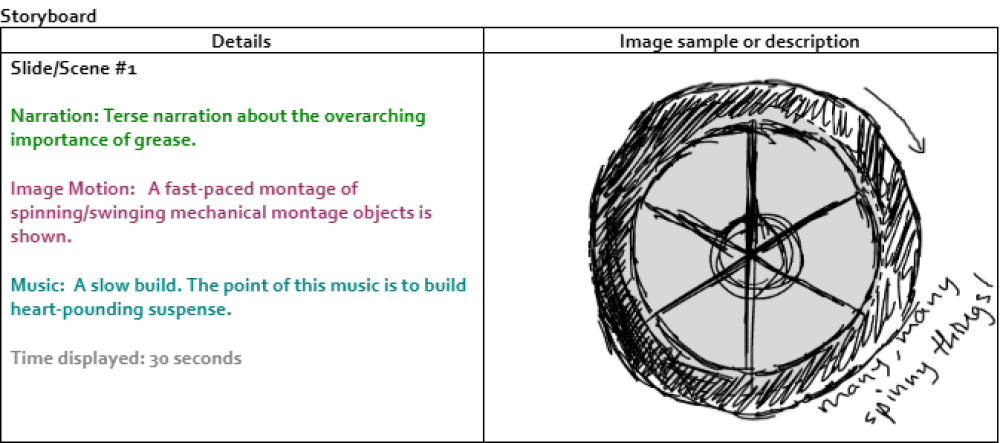
This document includes an example of a completed storyboard that helps students plan out their project.

Headshot of Michael Palmer
Michael Palmer

This is the storyboard for the "Grease" project listed above and is a good example of what a completed storyboard might look like and how it leads to a well-conceived and well-developed final project.

View excerpt
Was this resource helpful?
05

Resource: Project Rubric and Feedback Forms

Michael Palmer

This document contains a detailed assignment rubric as well as a set of feedback forms to guide peer, self, group, and instructor feedback.

Headshot of Michael Palmer
Michael Palmer

One of the challenges of assigning collaborative projects in large-enrollment courses is the logistic complexity of assessing students' work and the amount of time assessment takes. I developed a process and set of feedback forms to greatly simplify things.

The first form is used during presentations and allows 2-3 other groups to provide peer feedback during another group's project presentation. The second form collects anonymous peer feedback from members in each group about each person's contributions to the project. The third form solicits the group's self-assessment of their project, including suggesting a grade. In about five minutes, I'm able to collate all the feedback into one document and add my own thoughts.

Was this resource helpful?
06

Resource: Instructor Feedback Form

Michael Palmer

This form can help instructors aggregate all the feedback and share their own comments for students.

Headshot of Michael Palmer
Michael Palmer

Using all the information from the three student feedback forms and my own observations of the project, I'm quickly able to fill out this form, which includes my overall assessment of the project. Cutting and pasting from student feedback and adding a few of my own comments takes about 5 minutes per project. Before developing these feedback processes, each project would take me at least 30 minutes to assess (and the feedback wasn't as helpful).

Was this resource helpful?

Want to recommend a resource to add to this collection? Send us an email.